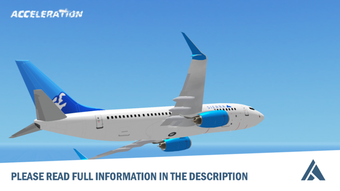

Flight Simulation for Roblox
Acceleration Flight Simulator is a free desktop application designed for Roblox users seeking an immersive flight experience within the platform. Developed by Atmosphere Studios, this utility enhances gameplay by introducing realistic flight mechanics, allowing players to pilot aircraft with precision and control. It serves as a tool for Roblox enthusiasts who enjoy simulation-based games, particularly those interested in aviation and flight dynamics.
The software is tailored for casual and intermediate Roblox players looking to expand their in-game capabilities without requiring advanced technical knowledge. Its integration with Roblox enables users to experiment with flight physics, explore virtual skies, and engage in aerial challenges. While the developer has not provided specific details about system requirements, the application is compatible with both Windows and Mac operating systems.
It is available in English, Spanish, and Italian, supporting a broad international audience. The software was first published on Softonic in August 2022 and remains accessible at no cost. Given its niche focus and free availability, it appeals to Roblox communities interested in simulation and flight-based gameplay.
Key Features & Capabilities
- Flight Mechanics Integration: Enables realistic aircraft control within Roblox, including takeoff, flight stabilization, and landing sequences.
- Multi-Language Support: Available in English, Spanish, and Italian, making it accessible to a global user base.
- Free Access: No cost to download or use, removing financial barriers for Roblox players of all ages.
- Roblox Platform Compatibility: Designed to function as a utility within the Roblox environment, enhancing existing flight-based games.
- Lightweight Design: At 15.7 MB, the application is compact, ensuring minimal storage impact on user devices.
The software is intended to be used in conjunction with Roblox games that support flight simulation. Users can leverage its features to improve their in-game performance, experiment with different flight styles, or participate in community-driven aerial events. Since it operates as a utility, it does not replace full flight simulators but serves as a supplementary tool for Roblox gameplay enhancement.
The developer has not specified advanced customization options or real-time physics adjustments. However, the inclusion of multiple language options suggests a focus on inclusivity and international accessibility. Its lightweight nature makes it suitable for devices with limited storage, particularly beneficial for younger users or those with older hardware.
The absence of premium features or in-app purchases aligns with its free model, ensuring a consistent user experience across all devices.
User Interface, Workflow & Performance
The user interface of Acceleration Flight Simulator is designed to be minimal and functional, focusing on ease of integration with the Roblox environment. As a utility tool, it likely operates through a simple overlay or in-game activation, avoiding complex menus or settings. Navigation is expected to be straightforward, relying on intuitive controls and clear visual cues.
The workflow is optimized for quick access—users can launch the software and begin using flight mechanics immediately, without lengthy setup procedures. Since the developer did not specify resource usage details, performance observations are based on general software behavior patterns. The application’s lightweight size of 15.7 MB suggests efficient memory usage and low CPU demand, making it suitable for systems with modest specifications.
Stability is not explicitly documented, but its role as a lightweight utility implies a reduced risk of crashes or conflicts with other applications. No known issues with system compatibility or background processes have been reported. The software does not appear to require constant internet connectivity, supporting offline usage within Roblox.
Overall, the workflow emphasizes accessibility and immediacy, catering to users who prioritize convenience and seamless gameplay integration.
Compatibility & System Requirements
Acceleration Flight Simulator is compatible with both Windows and Mac operating systems, allowing users across major desktop platforms to access the software. The application has a file size of 15.7 MB, indicating a lightweight installation that requires minimal disk space. The current version is listed as 0, which may suggest an early release or placeholder version number.
The developer did not provide additional system requirements, such as RAM, CPU, or GPU specifications. As a result, exact hardware compatibility details are not available. Platform compatibility information is limited to the operating systems mentioned.
Users are advised to ensure their device meets general Roblox system requirements to run the software effectively. The absence of detailed specifications means that performance on older or low-end machines cannot be confirmed. However, the small file size and utility nature of the application suggest it is designed for broad accessibility.
Users should verify that their device supports Roblox and has sufficient internet connectivity for full functionality. The software does not appear to require administrator privileges or special configurations during installation.
Pros and Cons
Pros
- Free to download and use, removing cost barriers for players.
- Compact size of 15.7 MB ensures minimal storage impact.
- Available in three languages: English, Spanish, and Italian.
- Designed for seamless integration with Roblox gameplay.
- Lightweight and likely low on system resources.
Cons
- Exact system requirements were not listed.
- Version number is listed as 0, which may indicate an incomplete or early release.
- No information on advanced customization or user settings.
- Developer has not provided performance benchmarks or stability reports.
- Compatibility with specific Roblox games is not confirmed.
Is Acceleration Flight Simulator compatible with all Roblox games?
The software is designed to work with Roblox games that support flight simulation, but compatibility with specific titles has not been confirmed by the developer.
Can I use this software offline?
Yes, the software does not require constant internet connectivity, allowing users to access its features during offline Roblox sessions.
Is the software safe to download?
Acceleration Flight Simulator was published on Softonic, a trusted platform for software downloads. However, users should always scan files with antivirus software before installation.
How often are updates released?
Information about update frequency is not available. The current version is listed as 0, which may suggest limited or irregular update cycles.
What type of license does this software use?
The software is free to use, with no reported licensing restrictions. It is distributed without cost, but the developer has not specified a formal license type.
Final Thoughts
Acceleration Flight Simulator offers a straightforward, free solution for Roblox players interested in enhancing their flight-based gameplay. Its lightweight design, multi-language support, and seamless integration with the Roblox platform make it a practical tool for a global audience. While detailed system requirements and performance data are unavailable, the software’s compact size and utility-focused nature suggest broad accessibility.
The lack of advanced features or customization options may limit its appeal to power users, but it remains a solid choice for casual players seeking a simple flight enhancement. The absence of a version number beyond “0” raises questions about its maturity, but its free status and compatibility with both Windows and Mac systems make it worth exploring. For Roblox enthusiasts focused on simulation and flight mechanics, this tool provides a low-effort entry point into more immersive aerial experiences.
Download Acceleration Flight Simulator now.







